On Thu, May 09, 2002 at 03:13:50PM -1000, Gerald Oskoboiny wrote in
http://impressive.net/archives/fogo/[email protected]
:
> Lately, my strategy with my digital camera has been to take a lot
> of pictures and then delete up to half of them before putting the
> best-quality ones on my site. (or sometimes just shrink them down;
> don't need to keep everything at 4 megapixels)
>
> In the past, the process I have used for that was to do "xv *"
> and then skip through all the images hitting ^D^D to delete the
> lame/redundant ones.
>
> But it's hard to do that while only viewing one image at a time
> (have to keep going back/forth between similar images to see
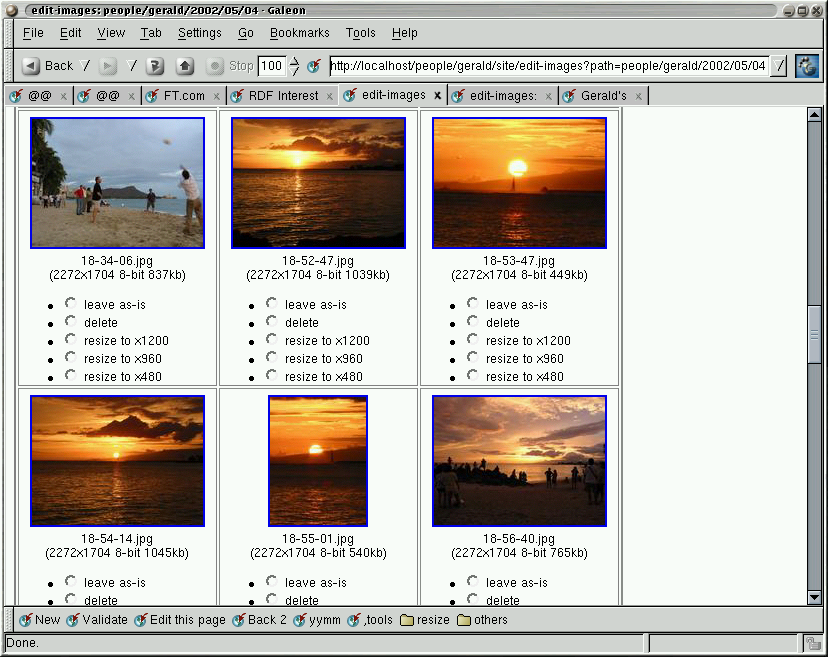
> which are the best ones), so I wrote a cgi script to display an
> overview of image thumbnails, with radio buttons under each image
> with choices like:
>
> * (*) leave as-is
> * ( ) delete
> * ( ) resize to x1200
> * ( ) resize to x960
> * ( ) resize to x480
I found this script wasn't as useful as I had hoped, because
looking only at thumbnails doesn't show me enough detail to let
me decide which of a few redundant images I should keep, etc.
In the meantime I found a nice lightweight image viewer that I am
using as a replacement for xv: qiv [1] (quick image viewer).
It has a nice feature where if you press 0-9, it runs
'qiv-command n foo.jpg', so I wrote a simple 'qiv-command' script [2]
that lets me rescale the current displayed image to some smaller
size if I don't want to keep the original 4 megapixel one around.
It uses another script I wrote, resize-images [3] to do the resizing.
Unfortunately it doesn't rewrite the internal exif metadata yet :(
Note that this and the edit-images script I wrote about before
are used to rescale the *original* image before it gets archived
on my site, not to make thumbnails etc for publication; I use
make_variants [4] for that. (why not just keep all the originals
around? Because they're about 2 megs each, which would be ~12G/yr
at the rate I shoot pics)
This stuff is still way too complicated and poorly-documented,
but my own publishing process is gradually getting better.
Tonight I'm going to a local linux user group meeting [5] to listen
and maybe talk a bit about linux and digital photography; should be
fun/useful.
[1]
http://www.klografx.net/qiv/
[2]
http://impressive.net/people/gerald/2002/08/qiv-command
[3]
http://impressive.net/software/photo/source/resize-images
[4]
http://impressive.net/software/photo/source/make_variants
[5]
http://www.oclug.on.ca/pipermail/oclug-announce/2002-August/000048.html
--
Gerald Oskoboiny <
[email protected]>
http://impressive.net/people/gerald/